‏إظهار الرسائل ذات التسميات Custom Recovery. إظهار كافة الرسائل

الاثنين، 7 نوفمبر 2016

How to flash Cherry mobile infinix XL stock rom via Custom recovery

Cherry mobile infinix XL stock rom picture
Hello guys today i will teach how to fix Cherry mobile infinix Xl stock rom via Custom recovery

Requirments
[StockRom##download##]
[CWM##download##](unchecked the shield and download)

  1. Reboot to Recovery (CWM/TWRP) (Press the Volume Up and Power button simultaneously)
  2. Wipe Data/factory reset, Wipe Cache Partition, Wipe Dalvik Cache.
  3. Install Zip from SD card
  4. Choose Zip from SD card
  5. Choose "[IP]StockRomV08.zip
  6. Install
  7. Wait
  8. Reboot system now

الثلاثاء، 26 يوليو 2016

How to root Meizu Mx4 and flash custom recovery

How to root Meizu Mx4 and flash custom recovery


 Meizu Mx4 Screenshots 


Requirements:


UNLOCKING PROCESS:
Flash clean stock firmware, do this only on android version: 4.4.2 firmware on MX4 (4.2.8.2A) 
************************************************** ************** (Android 5.0/5.1 firmwares uboot not patch) 

Get ROOT by standard method (flyme account). SuperSu NO NEEDED
Unpack on your disc (on PC) archive with firmware which you used to flash on your MX4 (4.2.8.2A) / M1 Note (4.2.0.5A) VERY IMPORTANT!!!
Place in a folder with unpacked archive (p.3) file "Meizu_Patch.exe" from folder "patcher" of your downloaded archive and open this with administrator rights.
-Theoretically, antiviruses can alarm to packer which patcher was compilated (but Dr.Web is fine) / but antiviruses recommended to be closed.
-If you are afraid about viruses and trojans, skip this step....and all the following.
If all goes well - we see a flashing green "SusseccFully Patched" in the patcher round window - continue.
If no and you see inscription "Patching Failed!", RED - STOP - something goes wrong and if you continue - BRICK!!!

Delete from this folder 2 files: "Meizu_Patch.exe" and "uboot.img.bak".
Create a folder with name "UNLOCK" in phone root directory (SD card)(DCIM folders, Picture, Music, data etc.) and copy in already patched loader file "uboot.img" from firmware folder from PC (where we started our patching (unpacked firmware)).
Pack this firmware (on PC) back in archive (using 7-zip/winrar) with name "update.zip" (default flyme firmwares) - could be useful.

Copy a folder "gscript" together with the contents in phone root directory (SD card).
Install "terminal emulator" on your phone from "gscript" folder.
Open terminal and write
su 
sh /sdcard/gscript/unlock.sh 
*Important!!* Wait 3 minutes for script action
Reboot your phone by command reboot . If it succesfully boot - congratulations, all right.


Further:

*WARNING!!!* All operations of modules flashing (recovery.img, boot.img etc.) doing ONLY BY STANDARD METHODS, by FASTBOOT command "fastboot flash"!! NOTHING ELSE!!
You can flash modified stock recovery from folder "patched-recovery" for MX4/M1 Note (your needs) by command: "fastboot flash recovery patched_recovery.img" and restrict the international version of firmware (in update.zip you can do all changes you want - signature will not check).
*CARE!!* If you flash index I firmware with patched recovery, USE Titanium or others to delete/freeze "System Update" from firmware. OTA UPDATE WILL BRICK YOUR DEVICE!!!
*CARE!!* Patched recovery will be rewritten on the usual stock recovery by first full android load, then after command "fastboot flash patched_recovery.img" turn off your phone and hold button "volume up" (+) and "power" before the phone starts (or delete "recovery-from-boot" as alternative).
You can flash custom recovery - and use it for your needs.
*CARE!!* DON'T try to flash stock meizu firmwares from any custom recovery, we have patched stock recovery for that.
ALWAYS DO A BACKUP!!


VERY IMPORTANT Notes: 
Not allowed "strange" combinations (for example flashing not patched loader and custom recovery). If system goes to bootloop - exit from "half-brick" could be very hard, if it all possible.
Loader patch and reverse packing stock firmwares should be done everywhere - it will save your time and nerves. You should avoid version mismatch of preloader - uboot - boot.img in smartphone firmware. Effects, bugs, lags can be very different.
*IMPORTANT!!* Then, if we flash "custom firmware", it should NOT CONTAINS "uboot.img" and "preloader.bin". All this can be flashed only in stock (modified) firmware, ONLY FROM STOCK or PATCHED STOCK recovery.
"uboot.img" CAN'T BE flashed by fastboot!! Also not allowed doing experiments with "preloader.bin". BRICK probability is very high!!


الجمعة، 3 يونيو 2016

How to install TWRP recovery to SKK Chronus Ace

How to install TWRP recovery to SKK Chronus Ace

SKK Chronus Ace Rooting and Flash TWRP Recovery

In this tutorial will teach you on how to install TWRP 3.0.2 recovery via ADB COMMAND for SKK MOBILE CHRONUS ACE (mt6580 chipset).

REQUREMENTS:
download all the ff:
ADB.rar
TWRP3.0.2
SKK Chronus Ace
PC
USB CABLE

Warning: Rooting can void your warranty! I'm not liable anything happen to your device.

Procedure:
1. first enable developer option go to setting click build number (tap 7 times) now go to developer option turn on usb debugging turn on oem unlocking
OEM UNLOCKING SCREENSHOT


2. To unlock bootloader Open the folder of ADB Then open a CMD window inside that folder. To do that, Shift + Right click on any empty white space inside the folder and then select Open command window here. 
3. Boot your Phone into Fastboot by Turning off your phone, Then press and Hold volume+ & Power then choose fastboot by navigating using volume+ and volume- as OK.  
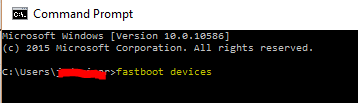
Confirm whether fastboot is working. run the following command in command window. Type fastboot devices  
fastboot-devices-screenshot

4. It should return your device serial number, if not you need to make sure your drivers are installed correctly. Once you've confirmed your fastboot connection to unlock the bootloader type the commandfastboot oem unlock
 fastboot oem unlock
5. You’ll see a new screen on your device. Choose Yes and confirm it. If it says your bootloader is unlocked you can proceed :
6. Type the command fastboot reboot 
fastboot reboot screenshot

then wait untill it boots completely on Your Homescreen.

FLASHING TWRP 3.02 recovery VIA FASTBOOT
  1. Open the folder of ADB then move TWRP or recovery.img in ADB folder.
  2. Then open a CMD window inside that folder. To do that, Shift + Right click on any empty white space inside the folder and then select Open command window here.
  3. Connect your Android device to the PC. Type the following into the command window to boot your device into bootloader/fastboot mode by using this command adb reboot bootloader└ If your asks for permission to “Allow USB debugging”, tap OK.
  4. Once your device boots into bootloader mode, type this into the command line. fastboot flash recovery recovery.imgfastboot flash recovery
  5. └ Here modify recovery.img with the name of your TWRP recovery .img file.
  6. Once TWRP is successfully flashed on your device, type this final command to reboot your device. fastboot reboot
  7. fastboot reboot screenshot
  8. If it occurs Bootloop or Error Mounting On TWRP, boot it again in fastboot mode then you have to format your phone by typing this Command
fastboot devices fastboot erase userdata fastboot erase cache fastboot reboot
How to root just proceed here.
Credits:
Star Shin Gacuma
Janeth VIllafuerte
SKK Chronus Ace group