‏إظهار الرسائل ذات التسميات Philz Recovery. إظهار كافة الرسائل

الأحد، 21 فبراير 2016

How to root CM Flare S3 Octa Lollipop and install Custom Recovery

How to root CM Flare S3 Octa Lollipop and install Custom Recovery

After an official update in Cherry Mobile Flare S3 Octa Kitkat to Lollipop version. I decided to make an update on how to root and Install Custom recovery. Hence, you can't use your custom recovery in kitkat to new update of lollipop version. I have 3 methods to root but I will teach you the most easiest way.
Root Flare S3 Octa Lollipop  Picture


Requirements:


CM Flare S3 Octa


Warning: Rooting can void your warranty!
Do it at your own risk!
FIRST METHOD
I-ROOTING
                                                   
I'm going to teach you on how to root CM Flare S3 Octa using updated Kingroot which can root even Android 5.1 or Lollipop version. 

1. Download and Install KINGROOT4.8.0.APK
2. Open Kingroot and click Optimize Now
kingroot

3. Wait to finish and click continue.
4. You can uninstall now other apps like Purify.
5. Download Rootchecker in Playstore to verify.


II-Installing Custom Recovery
Requirements:
Rashr tools
CWM (rename to recovery.img)
TWRP (rename to recovery.img)
1. Download Rashr Tool
2. Boot into Recovery
3. Locate recovery.img then flash!
Enjoy!

If Root was removed once reboot. Try to  flash this SuperSU-Beta-2.52.zip.

Here's stock recovery if you want to go back in stock recovery.


Credits:http://androidcribs.com
Kingroot
Yuweng for TWRP


SECOND METHOD
Warning: Rooting can void your warranty! Do it at your own risk!

Requirements:
CM flare S4
PC
USB CABLE

Download all:


(run exe file to load needed drivers)


2. Vcom drivers: .. (install sa pc)


(extract the file then copy to desktop)


4. CWM (rename to recovery.img)
    TWRP (rename to recovery.img)
     copy this CWM/TWRP inside (minimal adb fastbool tool folder)
recovery copy


(copy this to your root directory of sdcard(sa labas lang ng sdcard wag sa mga folder ok)


Before you Proceed don't blame me for any damage that will happen to your device...Do it at your own risk!!!!!


Procedure:
1. first enable developer option go to setting click build number (tap 7 times) now go to developer option turn on usb debugging turn on oem unlocking
OEM UNLOCKING


2. Boot your device to Fastboot mode (hold power button and vol up) choose fastboot mode or boot into bootloader, then connect your phone to PC via USB cable. Open folder fastboot from minimal adb fastboot tool(run as administrator)
Click Run me.bat
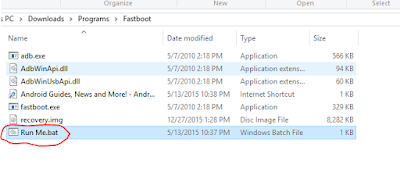
fastboot click run me.bat

3. Type this command:

"fastboot oem unlock" 


fastboot oem unlock

Then hit Enter

don't include (")  in adb ok! Just like in the image above.
4. Then ON your device follow the instructions (choose vol up to unlock/vol down if you dont want to continue unlocking)Then wait for minimal adb to successfully unlock your bootloader (it will erase all your files and restore device to factory state)remove your device then turn it on..(on screen it will show android erasing-- after that it will boot up wait 5 to 10 minutes)skip set up wizard(skip lang ng skip)then repeat step 1.then follow the next step below


Follow this guide to flash cwm recovery on your flare s4

Procedure: 
1. How to Use Minimal ADB and Fastboot Tool to Install Custom Recovery Boot your device to Fastboot mode(hold power button and vol up) choose fastboot mode)open minimal adb fastboot tool(run as admin).
 Follow step 2. above Click Run Me.bat

2. then type this command: 
"fastboot flash recovery recovery.img"


fastboot flash recovery

Then hit Enter
(again di kasama ung "" sa command hahaha)wait untill flashing finish it will take just a secs..

3. remove your device now force it to boot to recovery hold power/volume up (choose boot to recovery) then choose install files to sdcard (flash superSu) then Boom rooted kana!
always choose fix root access when rebooting... on cwm


الجمعة، 22 يناير 2016

How to root Myphone Rio 2 lite and install PHILZ recovery

How to root Myphone Rio 2 lite and install PHILZ recovery


Rio 2 lite Root and Recovery


I- ROOTING
1. Download and extract Kingroot4.1.zip 
2. Open the app. Tap the Green Circle Button.
3. Wait until the progress finishes up to 100 %.
4. If rooting is successful, restart your phone.
5. Look for Kinguser app on your app drawer. To check if you are succesfully rooted, install Root Checker app.


II - INSTALLING PHILZ RECOVERY

Requirements:
Download all:


1. PHILZ (rename to recovery.img)
3. rooted phone

========================================================================
Procedure:

Step1. download all required files and put it in your sd card.
Step2.download flashify then open if root permission is asked grant it.
Step3.choose recovery to flash and locate the recovery.img.
Step4.wait for the flashify to finish flashing it then reboot.
Step5.after booting into stock recovery , choose apply update from external storage and locate the update.zip .
Step6. you will boot into the CWM recovery and create a backup , and done xD
========================================================================
Notes:
To toggle recovery mode turn off the device and hold volume up + power button.
Volume keys are working in reverse order.


Credits:
http://androidcribs.com
Carliv
Yuweng
XDA


How to root Myphone Rio 2 fun and install TWRP/PHILZ recovery

How to root Myphone Rio 2 fun and install TWRP/PHILZ recovery


Rio 2 fun root and recovery


I- ROOTING
1. Download and extract Kingroot4.1.zip 
2. Open the app. Tap the Green Circle Button.
3. Wait until the progress finishes up to 100 %.
4. If rooting is successful, restart your phone.
5. Look for Kinguser app on your app drawer. To check if you are succesfully rooted, install Root Checker app.


II - INSTALLING TWRP/PHILZ RECOVERY

Requirements:
Download all:


1.TWRP (rename to recovery.img)

    PHILZ (rename to recovery.img)
4.rooted phone
========================================================================
Procedure:

Step1. download all required files and put it in your sd card.
Step2.download flashify then open if root permission is asked grant it.
Step3.choose recovery to flash and locate the recovery.img.
Step4.wait for the flashify to finish flashing it then reboot.
Step5.after booting into stock recovery , choose apply update from external storage and locate the update.zip .
Step6. you will boot into the CWM recovery and create a backup , and done xD
========================================================================

Credits:
http://androidcribs.com
Carliv
Yuweng
XDA


الأربعاء، 13 يناير 2016

How to root CM Infinix Pure and install Philz recovery

How to root CM Infinix Pure and install Philz recovery

CM Infinix Pure and Install Philz Recovery


Cherry Mobile Infinix Pure specs:
Android 4.4 Kitkat
5-inch HD (720 x 1280) IPS display
1.4GHz MediaTek octa-core Processor
1GB RAM / 8GB internal storage
expandable storage via microSD card support
8MP rear camera w/ LED flash
2MP front camera
OTG Ready
5 Point Multi Touch
YAMAHA Speaker
Dual-SIM, Dual-Standby
WiFi b/g/n
Bluetooth 4.0
2,100mAh Built-in battery
Mali 450 mp4 GPU


I- ROOTING
1. Download Kingroot 4.1
2. Open the app. Tap the Green Circle Button.
3. Wait until the progress finishes up to 100 %.
4. If rooting is successful, restart your phone.
5. Look for Kinguser app on your app drawer. To check if you are succesfully rooted, install Root Checker app.


II - INSTALLING PHILZ RECOVERY

Requirements:
Download all:
4.rooted phone
========================================================================
Procedure:

Step1. download all required files and put it in your sd card.
Step2.download flashify then open if root permission is asked grant it.
Step3.choose recovery to flash and locate the recovery.img.
Step4.wait for the flashify to finish flashing it then reboot.
Step5.after booting into stock recovery , choose apply update from external storage and locate the update.zip .
Step6. you will boot into the CWM recovery and create a backup , and done xD
========================================================================

Credits:
Philz
Carliv
CWM
XDA

الثلاثاء، 29 ديسمبر 2015

How to Root Cherry Mobile Flare S4 plus and Install Philz Recovery

How to Root Cherry Mobile Flare S4 plus and Install Philz Recovery
Since we successfully rooted CM FS4 and F4 with the help of our friends and developer, I made tutorial for rooting CM Fs4 plus with same procedure in F4 and FS4. Technically, this only beta tester and I'm not sure if could work for your device. Despite some of my tutorial are tested but for now we are trial and error experiment. I also need your cooperation. Just do it at your own risk. Leave comment below if this recovery work. Thank You!


Flare S4 plus Rooting


                                                         Cherry Mobile Flare S4 Plus Specifications
5.5-Inch Full HD IPS Display with OGS (1080 x 1920 Pixels, 401 ppi)
Scratch Resistant DragonTrail Glass
Android 5.1 Lollipop OS
MediaTek MT6753 Chipset
1.3GHz Octa Core 64-bit Cortex-A53 CPU
Mali-T720 GPU
3GB of RAM
16.0 Megapixel Autofocus Main Camera with BSI Sensor and LED Flash
8.0 Megapixel Front Camera
16GB Internal Storage
Expandable via MicroSD
Dual SIM (Micro + Nano/microSD)
4G LTE, 3G HSPA+, 2G EDGE and GPRS Networks
Wi-Fi and Wi-Fi Hotspot
HotKnot
Bluetooth 4.0
A-GPS
FM Radio
USB OTG
MicroUSB 2.0
3.5mm Audio Jack
Accelerometer
Proximity Sensor
Ambient Light Sensor
153 x 76 x 6.9 mm
2,800mAh Battery (Non-removable)
₱7,999.00 Official Price


Warning: Rooting can void your warranty! Do it at your own risk!

Requirements:
CM flare S4 plus
PC
USB CABLE

Download all:
(run exe file to load needed drivers)


2. Vcom drivers: .. (install sa pc)


(extract the file then copy to desktop)


4. Choose any of these two recovery:
    Philz Recovery for flare S4 plus: (rename to recovery.img)
    CWM Recovery for Flare S4 plus: (rename to recovery.img)
 copy this recovery.img inside (minimal adb fastboot tool folder)
recovery copy


(copy this to your root directory of sdcard(sa labas lang ng sdcard wag sa mga folder ok)


Before you Proceed don't blame me for any damage that will happen to your device...Do it at your own risk!!!!!Back up first your file and image. Can delete all during the procedure...

Method 1: VIA FASBOOT
Procedure:
1. first enable developer option go to setting click build number (tap 7 times) now go to developer option turn on usb debugging turn on oem unlocking
OEM UNLOCKING


2. Boot your device to Fastboot mode (hold power button and vol up) choose fastboot mode or boot into bootloader), then connect your phone to PC via USB cable. Open folder fastboot from minimal adb fastboot tool(run as administrator)
Click Run me.bat
fastboot click run me.bat

3. Type this command:

"fastboot oem unlock" 


fastboot oem unlock

Then hit Enter

don't include (")  in adb ok! Just like in the image above.
4. Then ON your device follow the instructions (choose vol up to unlock/vol down if you dont want to continue unlocking)Then wait for minimal adb to successfully unlock your bootloader (it will erase all your files and restore device to factory state)remove your device then turn it on..(on screen it will show android erasing-- after that it will boot up wait 5 to 10 minutes)skip set up wizard(skip lang ng skip)then repeat step 1.then follow the next step below


Follow this guide to flash cwm recovery on your flare s4

Procedure: 
1. How to Use Minimal ADB and Fastboot Tool to Install Custom Recovery Boot your device to Fastboot mode(hold power button and vol up) choose fastboot mode)open minimal adb fastboot tool(run as admin).
 Follow step 2. above Click Run Me.bat

2. then type this command: 
"fastboot flash recovery recovery.img"


fastboot flash recovery

Then hit Enter
(again di kasama ung "" sa command hahaha)wait untill flashing finish it will take just a secs..

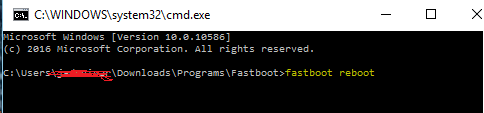
and then “fastboot reboot”.
fasboot reboot


3. remove your device now force it to boot to recovery hold power/volume up (choose boot to recovery) then choose install files to sdcard (flash superSu) then Boom rooted kana!
always choose fix root access when rebooting... on cwm

Download Rootchecker in PLaystore to verified!
rootchecker


Disclaimer: Please Give proper credit in my blog. Instead share this link and do not reupload my work...Some of the fb group sharing our work without saying simple "Thank you". So we plan that this particular group will stop developing rom. I just warned you!...


Credits:
Civlem Picones for uploading stock recovery
Denielle Cruz
LPT
Fastboot
Philz


How to Root Elephone P8000 and Install Philz Recovery


How to Root Elephone P8000 and Install Philz Recovery

elephone p8000 specs


Rooting via PC and Flash via SPFT

Requirements:
PC
USB Cable


Download Links:
Mediatek VCOM Drivers:

SP Flash Tool:

Elephone p8000 & Scatter File:

BETA-SuperSU-v2.52.zip:


 Instructions
1. Download all necessary files and Enable USB Debugging mode in your phone..
2. Install Drivers USB_VCOM_Driver.rar
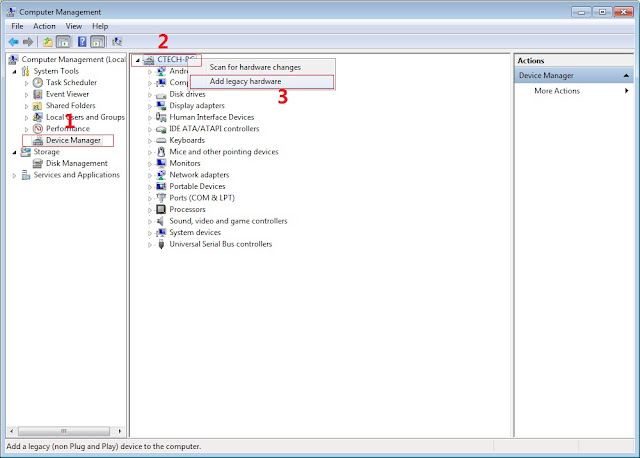
In Device Manager Right click on PC name(Right Side) and then click on Add legacy hardware as shown in image below.

Driver Installing
Now in Add Hardware Wizard click on Next » Install the Hardware that i manually select from a list (Advanced) » Show All Devices » Next » Have a Disk, Now select the any inf file from where you extracted the downloaded VCOM driver package.

Mediatek Preloader

 Now Click on Next and select Install this driver software anyway and wait for finishing the process.

SPFT SCREENSHOT

    After installation is finished then Restart your computer, That's it.
3. Extract SPFlash tool and flash2_twrp.zip
4. Copy the BETA-SuperSU-v2.52.zip to your phone.
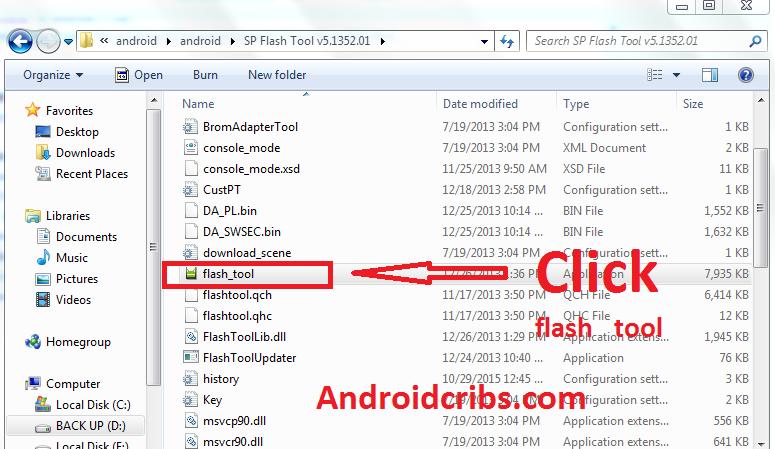
5. Open flash_tool.exe, click on the Download Tab
FLASH TOOL

6. Click Scatter-loading and browse for the scatter file(included in the Philz_Recovery_P8000.zip) (MT6753_Android_scatter)
7. Make sure flashing mode is set to "Download Only" and check mark only on the Recovery.
MT6573 SPFT RUNNING

8. Click Download.
9. Turn off your phone, connect your phone to the PC and wait for the flashing to commence.
10. Green Circle image will show once flashing is completed.
11. Important: Disconnect your phone from the computer, press and hold Vol Up + Power.
12. Boot menu will show, select Recovery.


From the custom recovery (philz), it is recommended to backup your phone first, before rooting.


To root:
1. Reboot your  phone then press and hold Vol Up + Power On
 the PHILZ Recovery , click Install.
2. Select BETA-SuperSU-v2.52.zip.
3. Flash it, no need to wipe cache, you can reboot as it is.
4. Enjoy your rooted  P8000.

Then download Root checker in Playstore to verified.