Download link [Stock Rom##download##] Steps *Turn off your device. *Press power botton + volume up (sabay) Select *wipe and format options -factory reset -wipe cache -wipe dalvik/art cache *Install zip from sd Select and install... After installing Go back to *wipe and format options -wipe cache -wipe dalvik/art cache Then Reboot..
2. Then On your internet or data. 3. Click Root then wait. 4. If success download rootchecker in playstore 5. If not please proceed to 2nd and 3rd method...
SECOND METHOD
(MED RISK)
Rooting via Fastboot
Pros: Medium Risk only.
Cons: Wrong command can't work unlocking. Can delete all your files. you need to back up first.
(copy this to your root directory of sdcard(sa labas lang ng sdcard wag sa mga folder ok)
PROCEDURE:
1) Unlock bootloader:
1.1) Boot for first time your device. I recommend to NOT register/login/add Wifi/add accounts/etc., because the unlock process DELETES all your data in the device. So to go more fast, skip all, and go directly to SETTINGS. In section ABOUT DEVICE, enable the developer options with eight time picks over “Build number”. Then in SETTINGS/DEVELOPER OPTIONS, enable the option “OEM unlocking”. Then power off.
1.2) Boot your device to Fastboot mode (hold power button and vol up) choose fastboot mode or boot into bootloader), then connect your phone to PC via USB cable. Open folder fastboot from minimal adb fastboot tool(run as administrator)
Click Run me.bat
Execute in your computer the command “fastboot oem unlock”, say YES with “vol+” and “power” buttons. Then select reboot. This ERASES completely your device (factory restore), but the bootloader will be UNLOCKED! Two reboots needed.
2) Install custom Recovery:
2.1) DownloadTWRP recovery and rename into recovery.img
copy this recovery.img inside (minimal adb fastboot tool folder)
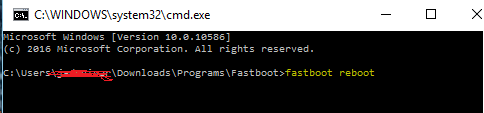
2.2) Boot in the BOOTLOADER mode. Then execute command “fastboot flash recovery recovery.img”;
and then “fastboot reboot”.
3) Rooting:
3.1) Copy last beta of SuperSU v2.52 to your SD Card (file BETA-SuperSU-v2.52.zip). Click Here
3.2) Boot in the TWRP with “Vol+” and “Power” buttons.
3.3) Install ZIP from external-sd card.
3.4) Reboot .
3.5) After boot, start SuperSU and configure it. Root done!
THIRD METHOD
(HIGH RISK)
Rooting via PC and Flash via SPFT
Pros: This tested 100% Can't delete file. you don't need to backup.
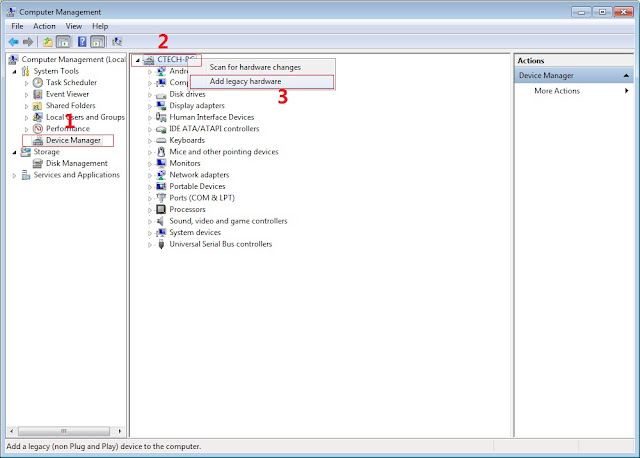
In Device Manager Right click on PC name(Right Side) and then click on Add legacy hardware as shown in image below.
Now in Add Hardware Wizard click on Next » Install the Hardware that i manually select from a list (Advanced) » Show All Devices » Next » Have a Disk, Now select the any inf file from where you extracted the downloaded VCOM driver package.
Now Click on Next and select Install this driver software anyway and wait for finishing the process.
After installation is finished then Restart your computer, That's it.
3. Extract SPFlash tool
4. Copy the BETA-SuperSU-v2.52.zip to your phone.
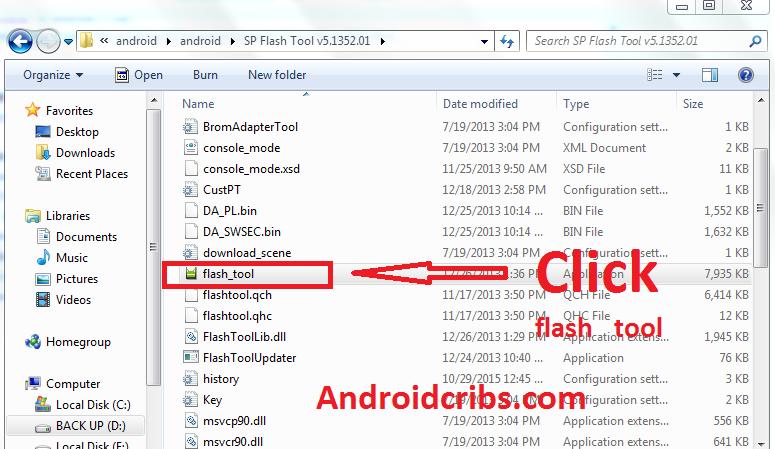
5. Open flash_tool.exe, click on the Download Tab
6. Click Scatter-loading and browse for the scatter file (MT6592_Android_scatter)
7. Make sure flashing mode is set to "Download Only" and check mark only on the Recovery.
8. Click Download.
9. Turn off your phone, connect your phone to the PC and wait for the flashing to commence.
10. Green Circle image will show once flashing is completed.
11. Important: Disconnect your phone from the computer, press and hold Vol Up + Power.
12. Boot menu will show, select Recovery.
From the custom recovery (CWM), it is recommended to backup your phone first, before rooting.
To root:
1. Reboot your phone then press and hold Vol Up + Power On
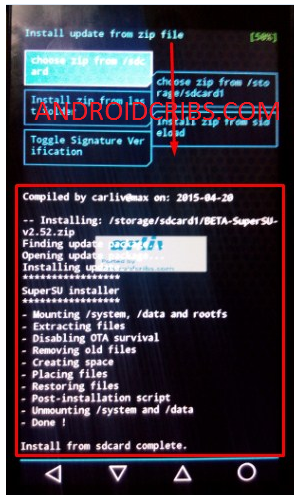
the CWM Recovery , click Install zip.
2. Choose zip from storage/sdcard1
3. Select BETA-SuperSU-v2.52.zip.
4. Tap Yes Install BETA-SuperSU-v2.52.zip.
5. Flash it, no need to wipe cache. Wait to finish. Once completed then reboot!
4. Enjoy your rooted Flare S Play.
Then download Root checker in Playstore to verified.
Note: This Picture and Procedure based in CWM but same as in TWRP.
Disclaimer:
Please give proper credits in my blog and Do not reupload, Instead share this link! Thank You!
(copy this to your root directory of sdcard(sa labas lang ng sdcard wag sa mga folder ok)
PROCEDURE:
1) Unlock bootloader:
1.1) Boot for first time your device. I recommend to NOT register/login/add Wifi/add accounts/etc., because the unlock process DELETES all your data in the device. So to go more fast, skip all, and go directly to SETTINGS. In section ABOUT DEVICE, enable the developer options with eight time picks over “Build number”. Then in SETTINGS/DEVELOPER OPTIONS, enable the option “OEM unlocking”. Then power off.
1.2) Boot your device to Fastboot mode (hold power button and vol up) choose fastboot mode or boot into bootloader), then connect your phone to PC via USB cable. Open folder fastboot from minimal adb fastboot tool(run as administrator)
Click Run me.bat
Execute in your computer the command “fastboot oem unlock”, say YES with “vol+” and “power” buttons. Then select reboot. This ERASES completely your device (factory restore), but the bootloader will be UNLOCKED! Two reboots needed.
How to Root MyPhone My36 and Install TWRP recovery
My36 Specs:
5.2-inch Full HD IPS display w/ Gorilla Glass 3 1.3GHz Octa-core 64-bit processor 3GB of RAM 16GB internal memory, w/ microSD support up to 64GB 13-megapixel rear camera 5-megapixel front-facing camera 4G LTE Dual-SIM / Dual-Standby 2900mAh battery Android Lollipop
Finally we made Rooting Procedure and Flashing TWRP and CWM recovery for MYphone My36. In this tutorial I have 2 method for Rooting. It's up to you of what you prefer. Just try the first method if not work proceed the 2 method.
Warning! Rooting can void your warranty!. DO it at Your own risk!
In Device Manager Right click on PC name(Right Side) and then click on Add legacy hardware as shown in image below.
Now in Add Hardware Wizard click on Next » Install the Hardware that i manually select from a list (Advanced) » Show All Devices » Next » Have a Disk, Now select the any inf file from where you extracted the downloaded VCOM driver package.
Now Click on Next and select Install this driver software anyway and wait for finishing the process.
After installation is finished then Restart your computer, That's it.
3. Extract SPFlash tool and flash2_twrp.zip
4. Copy the BETA-SuperSU-v2.52.zip to your phone.
5. Open flash_tool.exe, click on the Download Tab
6. Click Scatter-loading and browse for the scatter file(included in the My36 TWRP+Scatter file) (MT6753_Android_scatter)
7. Make sure flashing mode is set to "Download Only" and check mark only on the Recovery.
8. Click Download.
9. Turn off your phone, connect your phone to the PC and wait for the flashing to commence.
10. Green Circle image will show once flashing is completed.
11. Important: Disconnect your phone from the computer, press and hold Vol Up + Power.
12. Boot menu will show, select Recovery.
From the custom recovery (TWRP), it is recommended to backup your phone first, before rooting.
To root:
1. Reboot your phone then press and hold Vol Up + Power On
the TWRP Recovery , click Install.
2. Select BETA-SuperSU-v2.52.zip.
3. Flash it, no need to wipe cache, you can reboot as it is.
4. Enjoy your rooted MY36.
Then download Root checker in Playstore to verified.
(copy this to your root directory of sdcard(sa labas lang ng sdcard wag sa mga folder ok)
PROCEDURE:
1) Unlock bootloader:
1.1) Boot for first time your device. I recommend to NOT register/login/add Wifi/add accounts/etc., because the unlock process DELETES all your data in the device. So to go more fast, skip all, and go directly to SETTINGS. In section ABOUT DEVICE, enable the developer options with eight time picks over “Build number”. Then in SETTINGS/DEVELOPER OPTIONS, enable the option “OEM unlocking”. Then power off.
1.2) Boot your device to Fastboot mode (hold power button and vol up) choose fastboot mode or boot into bootloader), then connect your phone to PC via USB cable. Open folder fastboot from minimal adb fastboot tool(run as administrator)
Click Run me.bat
Execute in your computer the command “fastboot oem unlock”, say YES with “vol+” and “power” buttons. Then select reboot. This ERASES completely your device (factory restore), but the bootloader will be UNLOCKED! Two reboots needed.
2) Install custom Recovery:
2.1) Download from here choose any of these two: TWRP or CWM TWRP: Click Here