‏إظهار الرسائل ذات التسميات Stock Rom. إظهار كافة الرسائل

السبت، 19 نوفمبر 2016

how to flash Cherry mobile flare lite stock rom v1 via custom recovery

Cherry mobile flare cosmos force


[Stock rom(download the backups.zip)##download##]

*Turn off your device.
*Press power botton + volume up (sabay)
Select
*wipe and format options
-factory reset
-wipe cache
-wipe dalvik/art cache
*Install zip from sd
Select and install...
After installing
Go back to
*wipe and format options
-wipe cache
-wipe dalvik/art cache
Then Reboot..

الأحد، 13 نوفمبر 2016

How to flash cherry mobile flare j1 mini stock rom via SPD


Cherry Mobile Flare J1 Picture
requirements:
1.[FLASH TOOL##download##]
2.[SPD DRIVER##download##]
3.[Stock rom ##download##]

password:GSM_mazzamok
INSTRUCTIONS: 1. DOWNLOAD MO LAHAT NG NASA LINKS. 2. INSTALL USB DRIVERS AYON SA VERSION NG PC MO. 3.EXTRACT MO YUNG PAC FILES, KAHIT SAAN YUNG MADALI MONG MAKITA. 4.OPEN FLASHTOOL, CLICK MO YUNG GEAR NA ICON. HANAPIN MO YUNG PAC FILE. 5. TANGALIN MUNA BATTERY THEN BALIK ULIT, CLICK VOLUME DOWN, INSERT USB CABLE. 6. TAPOS CLICK MO YUNG ARROW SA FLASHTOOL. 7. WAIT TO DOWNLOAD ALL FILES. 8.DONE FLASHING!!!

الجمعة، 30 سبتمبر 2016

How to fix bootloop in Cherry Mobile Cubix Cube 3 with Stock Rom flash via SPFT

How to fix bootloop in Cherry Mobile Cubix Cube 3 with Stock Rom flash via SPFT
This tutorial help you oh how to fix bootloop and hardbrick in Cubix Cube 3.

Cubix Cube 3 Stockrom


Requirements:
PC
USB Cable

Download Links:
Mediatek VCOM Drivers
Cubix Cube 3


 Instructions
1. Download all necessary files and Enable USB Debugging mode in your phone..
2. Install Drivers USB_VCOM_Driver.rar
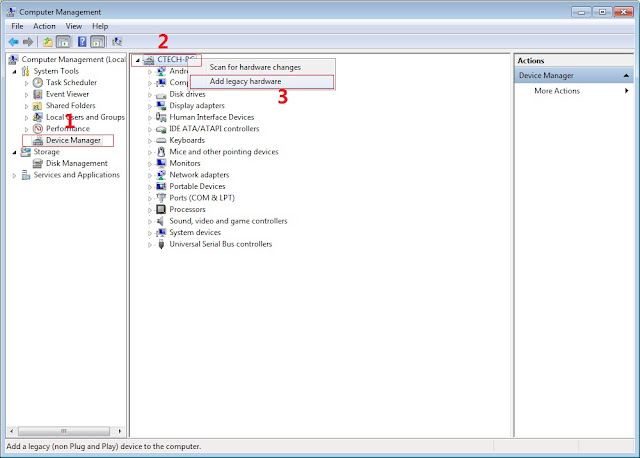
In Device Manager Right click on PC name(Right Side) and then click on Add legacy hardware as shown in image below.

Driver Installation
Now in Add Hardware Wizard click on Next » Install the Hardware that i manually select from a list (Advanced) » Show All Devices » Next » Have a Disk, Now select the any inf file from where you extracted the downloaded VCOM driver package.

Driver Installtion 2

3.  Now Click on Next and select Install this driver software anyway and wait for finishing the process.

Driver Installation 3

4.  After installation is finished then Restart your computer, That's it.
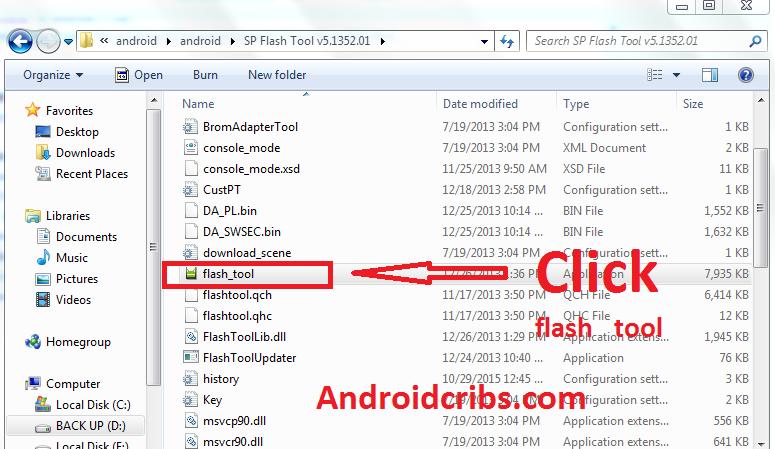
5. Open flash_tool.exe, click on the Download Tab
 Extract the downloaded Cubix Cube 3 stock rom to the new folder you created.
Driver Installation 4

6. Click Scatter-loading and browse for the scatter file (MT6753_Android_scatter)
7. For Bootloop only
 Make sure flashing mode is set to "Download Only" and check mark all except Preloader.
Note: If deadboot/hardbrick set "Download+Format" and check Preloader.
8. Click Download.
SPFT Download

9. Turn off your phone, connect your phone to the PC and wait for the flashing to commence.
10. Green Circle image with check will show once flashing is completed. That's it!

SPFT Success

11. Disconnect your phone in USB cord then open if still bootloop then try to factory reset in recovery settings. To go in recovery mode reboot your phone hold and press power on and volume up simultaneously until recovery mode appeared.
Credits:
Cubix Cube 3 Official Group

الخميس، 29 سبتمبر 2016

How to fix bootloop in Cherry Mobile Flare S4 Max via SPFT

How to fix bootloop in Cherry Mobile Flare S4 Max included Stock Rom flash via SPFT
This tutorial is able to help you oh how to fix bootloop and hardbrick in Flare S4 Max.
In case you don't have backup and installed custom recovery you can proceed in this procedure.

ow to fix bootloop in Cherry Mobile Flare S4 Max


Requirements:
PC
USB Cable

Download Links:
Mediatek VCOM Drivers
Flare S4 Max Stock rom(v2.9 lollipop)


 Instructions
1. Download all necessary files and Enable USB Debugging mode in your phone..
2. Install Drivers USB_VCOM_Driver.rar
In Device Manager Right click on PC name(Right Side) and then click on Add legacy hardware as shown in image below.

Driver Installation
Now in Add Hardware Wizard click on Next » Install the Hardware that i manually select from a list (Advanced) » Show All Devices » Next » Have a Disk, Now select the any inf file from where you extracted the downloaded VCOM driver package.

Driver Installtion 2

3.  Now Click on Next and select Install this driver software anyway and wait for finishing the process.

Driver Installation 3

4.  After installation is finished then Restart your computer, That's it.
5. Open flash_tool.exe, click on the Download Tab
 Extract the downloaded Flare S4 Max stock rom to the new folder you created.
Driver Installation 4

6. Click Scatter-loading and browse for the scatter file (MT6753_Android_scatter)
7. For Bootloop only
 Make sure flashing mode is set to "Download Only" and check mark all except Preloader.
Note: If deadboot/hardbrick set "Download+Format" and check Preloader.
8. Click Download.
SPFT Download

9. Turn off your phone, connect your phone to the PC and wait for the flashing to commence.
10. Green Circle image with check will show once flashing is completed. That's it!

SPFT Success

11. Disconnect your phone in USB cord then open if still bootloop then try to factory reset in recovery settings. To go in recovery mode reboot your phone hold and press power on and volume up simultaneously until recovery mode appeared.
Credits:
Socrates of Needrom

الاثنين، 25 يوليو 2016

Tutorial on How to Flash Stock Rom(Original Firmware) of Acer Liquid Z5 (Z150) via Sp Flash Tool

Tutorial on How to Flash Stock Rom(Original Firmware) of Acer Liquid Z5 (Z150) via Sp Flash Tool


Welcome Acer Liquid Z5 (Z150) Users! 
Is your phone bootloop and you can't fix it because you don't have any recoveries? Does your phone still experience  lag eventhough your done formating your device or even factory reset(hard reset) it?Facing Deadboot(Hardbrick)? Well, I think flashing it with original firmware is the best solution for your problem.


Acer Liquid Z5 (Z150) Screenshots


Requirements:
PC and USB Chord
Acer Liquid Z5 (Z150)

Download the following:

Drivers:
MT65xx-USB-Driver
MT6577 USB VCOM Drivers

Sp Flash Tool: 
Sp Flash Tool

Stock Rom(Original Firmware):
Acer_Liquid_Z5_Z150_Stock_ROM

Scatter File:
Scatter File


We are not responsible if anything happens to your phone.

Step by Step Tutorial Fo Flashing Stock Rom(Original Firmware) Using Sp Flash Tool:

*This can fix bootloop
*Phone lagness
*Making back the Original Rom

1. Ready your cable and phone. Must have atleast 70% charge. Phone must be turned off.
2. All of the files are in zip file, so you need to extract them all.Better if you will make one folder for your files then extract it.
3. Enable USB Debugging mode in your phone.
4. Install all MT65xx-USB-Driver
5.Install  USB VCOM Drivers
 In Device Manager Right click on PC name(Right Side) and then click on Add legacy hardware as shown in image below.

 USB VCOM Drivers Screenshots

Now in Add Hardware Wizard click on Next » Install the Hardware that i manually select from a list (Advanced) » Show All Devices » Next » Have a Disk, Now select the any inf file from where you extracted the downloaded VCOM driver package.

USB VCOM Drivers Screenshots

  Now Click on Next and select Install this driver software anyway and wait for finishing the process.


USB VCOM Drivers Screenshots

4.  After installation is finished then Restart your computer, That's it.
5. Open Flash tool click on the Download Tab
 Extract the downloaded Acer Liquid Z5 (Z150) stock rom to the new folder you created.
(NOTE: I'm using other screenshots of other phone since I don't have that device though the process is still the same so no worries).

Sp Flash Tool Screenshots

6. Click Scatter-loading and browse for the scatter file (MT6575_Android_scatter)
7. For Bootloop only
 Make sure flashing mode is set to "Download Only" and check mark all except Preloader.
Note: If deadboot/hardbrick set "Download+Format" and check Preloader.
8. Click Download.

Sp Flash Tool Screenshots


9. Turn off your phone, connect your phone to the PC and wait for the flashing to commence.
10. Green Circle image with check will show once flashing is completed. That's it!

Sp Flash Tool Screenshots

11. Disconnect your phone in USB cord then open if still bootloop then try to factory reset in recovery settings. To go in recovery mode reboot your phone hold and press power on and volume up simultaneously until recovery mode appeared.

Hope it helps! Thanks!