‏إظهار الرسائل ذات التسميات Web Sites. إظهار كافة الرسائل

السبت، 31 يناير 2015

50+ Best Free Android Tutorials | Web Resources To Learn Android Programming Online


Although, Android Programming language makes use of a specialized form of Java, the two are very different from each other. Android is defined as a software stack which consists of an operating system, key applications and middle-ware. It is meant for different kinds of mobiles and tablets. Most of the companies today are making use of Android programming language for the purpose of application development and maintenance and are constantly on the lookout for experienced Android developers. Hence, learning this language will put you one step ahead of all your competitors and will help you grab the best of jobs within the industry.

Android development expects you to be familiar with Java development. Java technology has grown huge and this may discourage a lot of people since you may think that you need to learn a lot of things before you can get started. Good news is that you do not need to learn everything in Java technology to be an android developer. Focus your learning on core java and move to Android specific tutorials/resources. 

The different kind of free web resources which will help you learn Android programming online are:

Free Websites

As a beginner, it is best to start with Android based websites which will give you a detailed description of all the aspects of an Android App (i.e. how does it look and feel) along with the capabilities of an Android platform.
  1. Official Developer Tutorial created by the android community and open source developers. This getting started tutorial is designed for beginner developers.
  2. Official Developer Tutorials Community Official developer tutorials created by android community. This tutorial is designed for experienced developers.
  3. Tutorial by Lars Vogel
    This is free single page web based tutorial created by Lars Vogel.
  4. Android Tutorials By Core Servlets 
    This site contains a series of android tutorial with exercise for each section. This site also contains some other good Java related tutorials for free.
  5. Android Hive
    Android Hive is a android tutorials blog by a enthusiastic android developer (Ravi Tamada), who likes to share his knowledge and experience with the world.
  6. Java Code Geeks
    This site contains Java and related technology tutorials and some of the Android tutorials are really useful in everyday android programming.
  7. Edumobile - This is a android tutorial blog that is created by experienced trainers. This site also offers
  8. HelloAndroid - This contains some good articles with code snippets.
  9. TutorialForAndroid
    http://www.tutorialforandroid.com/p/android-tutorials.html - is a decent blog containing few android tutorials. The Drawing with Canvas series of tutorials on this blog are really good.
  10. Marakana Android Tutorial - This is a simple location service example by a develoepr at Markana Inc.
  11. HigherPass - This site contains some android tutorials as well.
  12. How to Create Android Wallpaper
  13. Script Tutorials
  14. Android Tutorial By TutsPlus
  15. Learn Android
  16. Android Programmer Guru - Its a dedicated blog with dozens of short and useful android tutorials.

Free Video Tutorials

These video tutorials are a very effective way to start out with Android. The massive tutorial series available online contains tons of free content, which is bound to teach you coding in the best possible manner.
  1. Chet Haase Android Tutorials on YouTube - Some really good and simple tutorial by google developer and author CHET HAASE on youtube are 
  2. By Udemy
  3. By OreillyMedia
  4. By MarakanaTechTV
  5. By Android User Group
  6. XDA Developers
  7. Other YouTube Playlists
  8. http://www.youtube.com/course?list=EC2F07DBCDCC01493A
  9. http://www.youtube.com/playlist?list=PLAgylfU8wrtvWlSlVhFQZtE311sProxQF
  10. http://www.youtube.com/playlist?list=PL9E21BFF408167ED6
  11. http://www.youtube.com/playlist?list=PL929126B1E0480779

Free E-books

The web is loaded with hundreds of free e-books on Android programming which contain all the fundamental concepts pertaining to the language, both at the beginner as well as advanced levels. You will not only be introduced to the language but will also get to learn important application like creating user interface, connecting to the network, storing data, etc.
  1. Android Tutorial By Stanford University
  2. The Complete Android Guide
  3. Android Tutorial
  4. Commonsware Android
  5. Andbook
  6. E Reading Llib Android eBook
  7. App Inventor eBook
  8. Android Security eBook

Free White Papers

There has been many companies doing parallel research on android and its abilities. These are some of the great advanced reading reference that you can use to be an expert at android development.
  1. White Paper By ATNT
  2. White Paper By NVDIA
  3. White Paper By MCafee
  4. White Paper By Texas Instrument

Best Free Web Forums To Ask Questions

These free web forums will help you become a part of the worldwide Android community where you not only get a chance to seek solutions to your own problems but can also share your own knowledge and expertise with others.
Before you jump on to a forum make sure you check the frequently asked questions on it for exmaple this FAQ at Stack Overflow
  1. Stackoverflow
  2. Androidforums
  3. Androidcentral
  4. xda-developers
  5. Android.net
  6. AndroidForum
  7. AndroidPit

Best Free Cheat Sheets For Java/Android

Java cheat sheets will act as your quick reference guide for Android applications as well. It contains all the important information in a nut shell and helps you take a quick look at the various concepts.
  1. Computer World Cheat Sheet - Android Cheatsheet
  2. Cheatsheet for Graphic Designers - Graphic Design on Android
  3. DZone Android Cheatsheet -DZone Refcard on Android
  4. Android Guidelines Cheat Sheet By Kinvey -Android Guidelines

الخميس، 29 يناير 2015

Designing the Navigation of a New Website

Other than the visual design, determining how a user will navigate a website is one of the more challenging creative tasks that you’ll face as a web designer. The main goal is to make people feel in control of the site and capable of getting around quickly and efficiently. Nothing is worse than a user feeling lost in your site.

To help people get around and stay oriented, your navigation scheme must be a road map of the entire site, complete with “you are here” signs.

Global navigation for websites

Remember the famous line from the 1970s TV commercial: “How many licks does it take to get to the center of a Tootsie Pop?” With candy, the more licks, the better. On the web, however, the opposite is true: Users won’t find anything tasty about navigating through gobs of pages. Your goal is to get users as quickly as you can to their desired content.

The best way to reduce the number of clicks is to provide your primary, secondary, and tertiary navigation sets on each page of the site. This strategy, called global navigation, enables people to quickly navigate from one main section to the next without needing to retrace any steps. Additionally, it’s important that these navigation sets are always located in the same place and do not change what they offer (swapping navigation options in and out). This consistency provides a mental anchor for the user.

Credit: © Apple, Inc.
Apple’s global navigation system allows users to stay oriented and to quickly traverse from one section to the next.

Section navigation

After users select a category from the primary, secondary, or tertiary navigation group, they’re transported into a section. Assuming that the section has a few levels of content within it, you need a way to navigate through it. A typical practice is to reveal a set of section navigation choices on the page. These choices are unique to their section, but the region you select to display them is the same region used to display section navigation for other areas of the site.


This section navigation design reveals the first level of pages in the Products area of the website.


This section navigation design reveals first- and second-level pages in the Products area.
Alternatively, you can display the section navigation fully opened. The advantage is that users can quickly see all the first- and second-level content with a section. The disadvantage is that the navigation can take up a lot of room and may look cluttered and overwhelming to the user.


Section navigation is often shown as a drop-down menu as well as on the page itself.
Typically, just the first level of pages is shown, but flyout menus can provide quick access to second-level pages. It is okay to have redundant section navigation, showing it both on the page and including it as a drop-down menu in the global navigation system.

Leaving a trail of bread crumbs

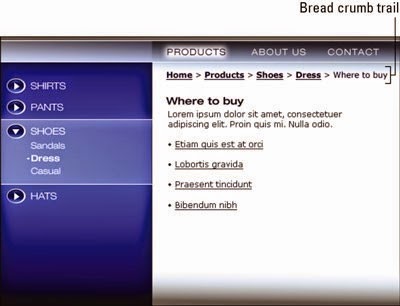
If Hansel and Gretel can use a trail of bread crumbs to find their way back through the forest, just think of what a digital version of bread crumbs can do for visitors to your website. Bread crumbs, as they’re actually called in the web-design industry, are text links you leave in a trail that marks your steps as you go deep into a section.


This bread-crumb trail provides a convenient way to retrace your steps in a site.
Bread crumbs are helpful to navigate sites that have navigation that goes more than two levels deep within a section. For example, if you use the section navigation to go down to a page that has even more links on it, you are now diving into a third or fourth level of the section’s hierarchy. It’s just not practical to display third- and fourth-level navigation on the page. So the bread crumbs can simply record your steps and get longer and longer as you dive deeper (hopefully no more than four levels or you’re getting into the catacombs of the site!).

Each bread-crumb link provides a quick way to retrace your steps back up the hierarchy. You don’t have to follow the links in sequence; you can click any link in the trail to jump quickly back to a different level in the hierarchy. The trail also gives you a good idea of where you are in the site. Unlike with a global navigation scheme, however, you cannot jump across to another section; you can only jump back to a level within a section. Think of a bread-crumb system as the browser’s Back button on steroids.

Graphically, the design convention for a bread-crumb interface is to show each previous step as an active text link followed by a character (arrow, colon, or pipe), all in a simple row. The last entry at the end of the trail represents the current page you’re on, so it should not be a link — and it should look different. If it were a link, it would simply reload the page — not the ideal user experience.

الأحد، 25 يناير 2015

How to Create Web-Site in Drupal

Drupal is written in PHP and requires a MySQL database, both of which are available with the SiteGroundDrupal hosting services. The Drupal basic installation can be easily turned into many different types of web pages - from simple web blogs to large online communities. A Drupal installation can be turned into a content management system, a blog, a forum, a newsletter system, a picture gallery and more. Here we will explain the use of Drupal as a blog application.

Drupal installation

Please, visit the pages listed below to find detailed instructions how to install Drupal on your website with the help of the Softaculous auto-installation tool or through the web installer.

How to create a blog site with Drupal?

Once you have finished with the installation of Drupal, you should navigate to the web address, where the script is located and you will see the main page. First you should log in with your administrative account or create a new one:

Then you can create content, edit your profile, manage your installation and more from the administer panel:

To start using Drupal as a blog, you should first enable the Blog module from the Modules area. 

Drupal Settings

Go to Structure -> Blocks and add the Recent blog posts block in the preferred location on your web site layout. 

After that you should continue setting the access control for the blogging options in the People section as explained in the Drupal Access Control tutorial. New users for the blogging activity can be added from People -> Add user.

Creating Content

Next you should open the Content area and navigate to Add content -> Blog Entry.

Enter the blog post and save it.
It will be automatically promoted to the front page and a menu entry in the previously chosen location will be visualized.
Once you are done, you can go to your home page. There you will see your post.

Useful links

For more information on how to create different type of websites, check our page on how to make a websitewith SiteGround Website Wizard.

السبت، 24 يناير 2015

Borrowing Winning Web Site Ideas


All good Web sites grow and evolve. If you start with a strong design and pay close attention to some basic rules about interface, navigation, and style, you have a better foundation to build on. The following design ideas can help you create a compelling Web site that grows gracefully.

1) Make it easy
Creating a clear and intuitive navigational system is one of the more important elements in creating a Web site. Nothing is likely to frustrate your visitors more than not being able to find what they're looking for. Make sure that visitors can easily get to all the main sections of your site from every page in the site.
You can best do this by creating a set of links to each of the main sections and placing it at the top or side of every page. If the pages are very long, consider including a navigation bar, or footer, at the bottom of the page as well. Often the navigation bar at the bottom of the page is just a list of text links. The bottom of the page is also an ideal place to include basic contact information. A set of graphical icons can make this navigational element an attractive part of your design. Your goal is to make sure that viewers don't have to use the Back button in their browsers to move around your site.


2) White space is not wasted space
One of the better design features you can add to a page is nothing at all (also known as white space). Understand that white space, in this case, is not always white; it's simply space that you haven't crammed full of text or images. It can be any color, but it's usually most effective if it's the color or pattern of your background. White space gives the eye a rest, something readers need even more often when they're staring at a computer monitor. You can use white space to separate one type of information from another and to focus the viewer's attention where you want it most. Some of the most beautiful and compelling designs on the Web use only a few well-thought-out elements against lots of white space.

3) Design for your audience
No matter how technically sophisticated a Web site is or how great the writing, most people notice the design first. Make sure that you leave plenty of time and budget to develop an appropriate and attractive design for your Web site. The right design is one that best suits your audience — that may or may not mean lots of fancy graphics and animations.

4) Back it up
Make sure you have a system in place to back up your Web site. Always keep a copy of all the files that are on your server in a separate location and update it regularly to make sure you have the latest version of your site backed up at all times. Even the best Internet Service Providers sometimes have technical problems, so you should keep a backup of your site where you have easy access to it and can get it back online quickly if something ever does happen to delete any or all the files you have on the server.
Also keep a backup of your original source files, such as Photoshop images. For example, when you develop images for the Web, you usually start in a program like Photoshop, creating a high-resolution image that may include layers and other elements. Before the image goes on your Web site, those layers get flattened and the image gets compressed or reduced and converted into a GIF or JPEG. If you ever want to go back and alter that image in the future, you'll want the original source file before it was compressed and the layers were flattened. Whether you create your own images or your hire a professional designer, make sure you develop a system for saving all these original elements when they are created.

5) Small and fast
Despite all the promises that unlimited bandwidth was coming soon, the biggest problem on the Internet is still speed. Making sure that your pages download quickly makes your viewers more likely to keep clicking.
If your page designs take a long time to download, here are a few likely reasons and suggestions for how to make them load faster: First, take a look at multimedia elements and consider reducing the size or at least offering users the option to skip large multimedia files, such as Flash introductions. You especially don't want to make users wait too long for the first page of your site. If you suspect that static images are the problem, consider compression methods and use a program such as Fireworks or ImageReady that are designed for optimizing images for the Web. Finally, use Dreamweaver's code cleanup feature to get rid of extra tags that can contribute to a heavier page. To use this, choose Commands --> Clean Up HTML.

6) Follow the Three Clicks Rule
The Three Clicks Rule states that no important piece of information should ever be more than three clicks away from anywhere else on your Web site. The most important information should be even closer at hand. Some information, such as contact information, should never be more than one click away. Make it easy for viewers to find information by creating a site map and a navigation bar — a set of links to all the main sections on your site.

7) Map it out
As your site gets larger, providing easy access to all the information on your Web site may get harder and harder. A great solution is to provide a site map, which is a page that includes links to almost every other page in the site. The site map can become a busy page and usually appears best in outline form. This page should be highly functional — it doesn't matter if it looks pretty. Don't put lots of graphics on this page; it should load quickly and provide easy access to anything that your visitors need.